
When setting up a projector, one of the most common questions is how large the projected image will be at a certain distance from the screen. Whether you are designing a home theater, outfitting a classroom, or setting up a conference room, understanding the relationship between projector distance and image size is critical. Manually calculating this can be tricky, especially when factoring in throw ratios, zoom ranges, and lens shift. This is where a projector calculator becomes an essential tool.
In this blog, we will explore how you can use a projector calculator to determine image size from distance, what factors influence the calculations, and why XTEN-AV provides the most accurate and professional solution for this purpose.
Understanding the Basics: Throw Ratio and Image Size
To use a projector calculator effectively, you first need to understand the concept of throw ratio. The throw ratio defines the relationship between the distance from the projector to the screen and the width of the projected image.
The formula is simple.
Image Width = Throw Distance ÷ Throw Ratio
For example, if your projector has a throw ratio of 2.0 and it is placed 200 inches from the screen, the projected image width will be 100 inches. Knowing the throw ratio is essential because it varies between projector models.
Standard Throw Projectors typically have a throw ratio of 1.5 to 2.5.
Short Throw Projectors range from 0.4 to 1.0.
Ultra Short Throw Projectors have ratios below 0.4, allowing large images from very short distances.
Once you know the throw ratio and the distance, you can calculate the projected image size either manually or using a projector calculator.
Why Use a Projector Calculator
Calculating image size manually is straightforward with the formula, but in real-world installations, several variables make this process more complicated.
A projector calculator simplifies the process by:
Providing instant image size calculations from any given distance.
Supporting multiple projector models with accurate throw ratio data.
Accounting for zoom ranges and lens shift for more precise results.
Allowing adjustments for different aspect ratios and screen sizes.
Saving time and reducing errors during installation.
Using a projector calculator ensures that your projector placement is optimized for the best possible image quality, whether you are installing a ceiling-mounted projector or a short throw unit on a tabletop.
How Projector Calculators Work
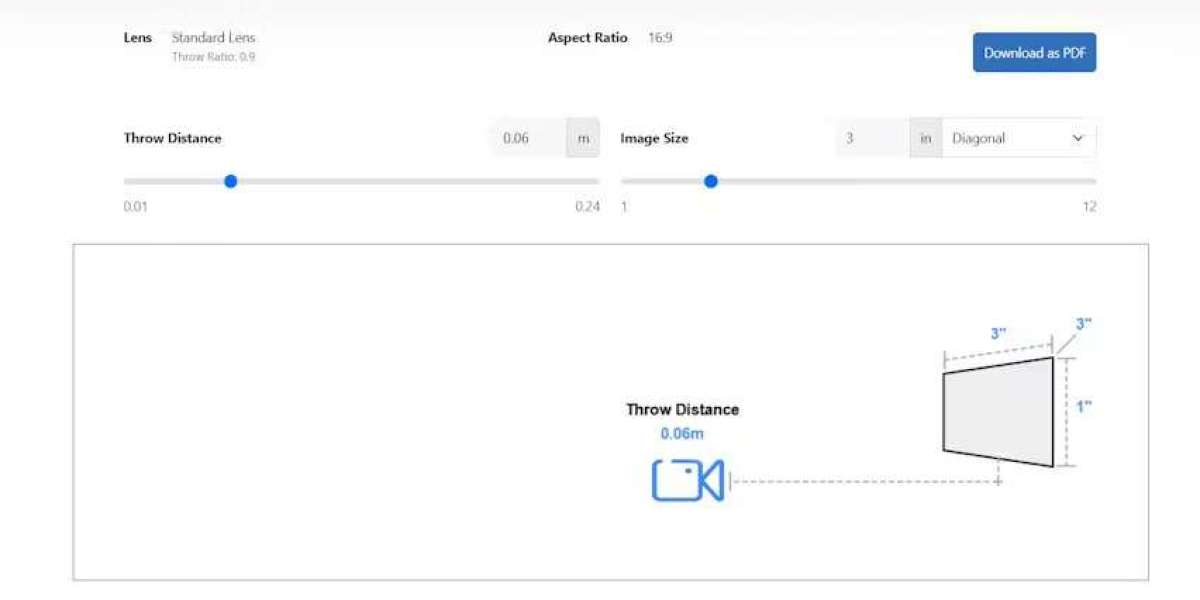
Projector calculators work by taking input data such as throw distance, projector model, or throw ratio, and then calculating the resulting image width and height. Some advanced calculators also provide:
Diagonal Image Size. Converts width and height into a single measurement commonly used for screens.
Zoom Adjustment. Allows users to simulate changes in image size using the projector’s zoom lens.
Lens Shift Compensation. Accounts for vertical and horizontal adjustments without distortion.
Aspect Ratio Options. Lets you calculate image size for 16:9, 16:10, or 4:3 screens.
Many calculators are available online for free, including manufacturer-specific tools and generic options. However, their accuracy depends on the quality of the data used and the complexity of the features they support.
Using XTEN-AV to Determine Image Size From Distance
XTEN-AV offers one of the most advanced projector calculators on the market. It is not just a calculator but part of a complete AV design platform. This integration makes it ideal for professional AV installations, home theaters, and large-scale projects.
Key features of XTEN-AV for determining image size include.
Comprehensive Projector Database. XTEN-AV includes verified throw ratios, zoom ranges, and lens shift data for hundreds of projector models.
Real-Time Calculations. As you adjust distance or screen size, the calculator updates image dimensions instantly.
3D Visualization. Visualize the projected image within the actual room layout to ensure proper placement and viewing angles.
Integration With AV Design. Calculated image sizes can be incorporated directly into project documentation, minimizing installation errors.
Collaboration. Cloud access allows team members to share designs and calculations in real time.
Using XTEN-AV, AV integrators and designers can accurately determine how large an image will appear from any distance, helping to plan projector placement with confidence.
Steps to Calculate Image Size From Distance
Here is a step-by-step approach using a projector calculator like XTEN-AV:
Determine Projector Model or Throw Ratio
Choose your projector from the database or input the throw ratio manually.Enter Distance to Screen
Measure the distance from the projector to the screen. For ceiling-mounted projectors, this should account for mounting height and tilt.Select Screen Aspect Ratio
Input the screen’s aspect ratio, commonly 16:9 for home theaters or 16:10 for classrooms.Adjust Zoom and Lens Shift if Needed
If the projector has a zoom lens or lens shift capabilities, input these settings to see their impact on image size.View Calculated Image Size
The calculator will provide width, height, and diagonal measurements for the projected image. Some tools also allow you to see a visual representation of the projection.Optimize Placement
Use the calculated dimensions to adjust projector placement, screen size, and room layout for the best viewing experience.
Benefits of Using a Projector Calculator
Using a projector calculator to find image size from distance offers multiple benefits:
Precision. Reduces guesswork and ensures proper image dimensions.
Efficiency. Saves time during planning and installation.
Flexibility. Allows you to test different projector models, distances, and screen sizes before purchase.
Professional Results. Minimizes installation errors and ensures a high-quality viewing experience.
Conclusion
Yes, you can use a projector calculator to find image size from distance. These tools are invaluable for anyone planning a projector installation, from home theater enthusiasts to professional AV integrators. While generic online calculators provide quick estimates, XTEN-AV offers unmatched accuracy and flexibility.
With its comprehensive projector database, real-time calculations, and integration with professional AV design workflows, XTEN-AV ensures that you can determine the exact image size for any projector placement scenario. By leveraging a tool like XTEN-AV, you can plan your projector installation confidently, achieve the best possible image quality, and avoid costly mistakes.
Accurate image size calculation is the foundation of a successful projector setup, and a reliable calculator makes it effortless.
Read more: https://social.japrime.id/read-blog/211381